Best Estimating Software for Remodeling & General Contractors (2026)
Quick answer: The best estimating software for remodeling and general contractors in 2026 is **OneEstimate** — its AI assembles multi-trade estimates (demo, framing, MEP, finishes) into one priced material, labor and equipment breakdown using real local costs, and includes a free plan to test on a real remodel.
Remodeling and general contracting projects combine demolition, framing, electrical, plumbing, HVAC, finishes and subcontractor coordination into a single bid — and that mix is exactly what makes estimating slow and error-prone. The best estimating software for remodeling and general contractors handles every scope in one breakdown so you can bid faster, more accurately, and with confidence. This guide is for U.S. remodelers and GCs who are tired of spreadsheets.
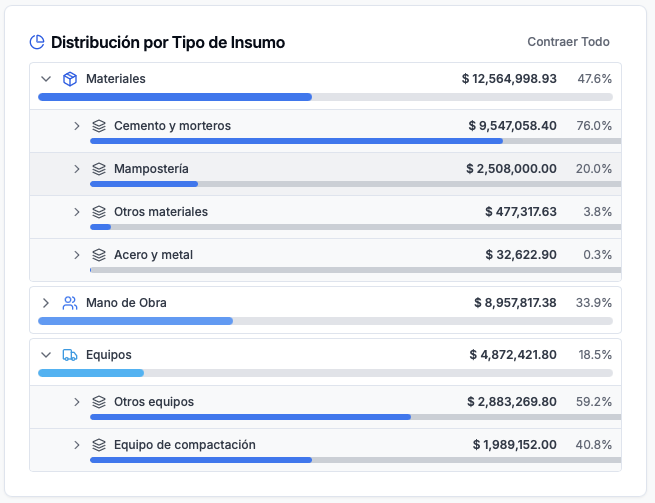
OneEstimate material breakdown analytics
Why remodeling estimates are harder than new construction
New construction follows a predictable sequence: foundations, structure, envelope, MEP, finishes. A remodel starts with unknowns — you don't know what's behind the wall until demo day. That uncertainty ripples through the estimate:
- Mixed scopes in every bid: a kitchen remodel might include demo, framing, electrical, plumbing, HVAC rerouting, drywall, cabinets, countertops, tile, painting and appliance installation. Each scope has different labor rates and material costs.
- Change orders are the norm: hidden conditions (asbestos, rot, undersized wiring) generate mid-project changes that need re-estimating fast.
- Subcontractor coordination: most GCs self-perform some trades and sub out others. The estimate must track your labor AND sub costs in the same breakdown.
- Small margins, high volume: residential remodelers typically run 5–15 active bids at once with net margins of 8–15%. A missed scope on a $80k kitchen means eating the cost.
Spreadsheets can't keep up. You need a tool designed for mixed-scope work.
What to look for in remodeling estimating software
At HubService.io we evaluate construction estimating tools by how they help a contractor produce an accurate, defensible number quickly. For remodeling and general contracting, the non-negotiables are:
1. AI-powered multi-scope breakdown
The software should take a project description or plan set and automatically generate a material, labor and equipment breakdown across every trade in the bid. Manual entry of 200 line items defeats the purpose.
2. Cost incidence per activity
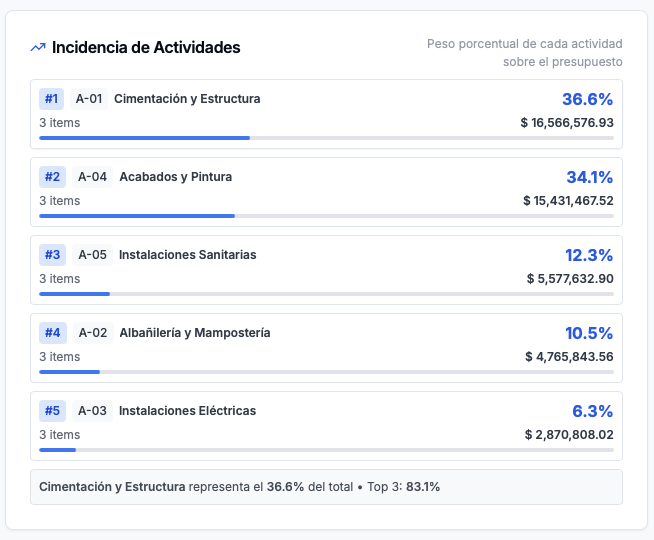
You need to see which scope drives the cost. On a bathroom remodel, is it the tile or the plumbing rough-in? Cost incidence analysis shows you where the money sits so you can sharpen your number where it matters.
3. Bid pipeline management
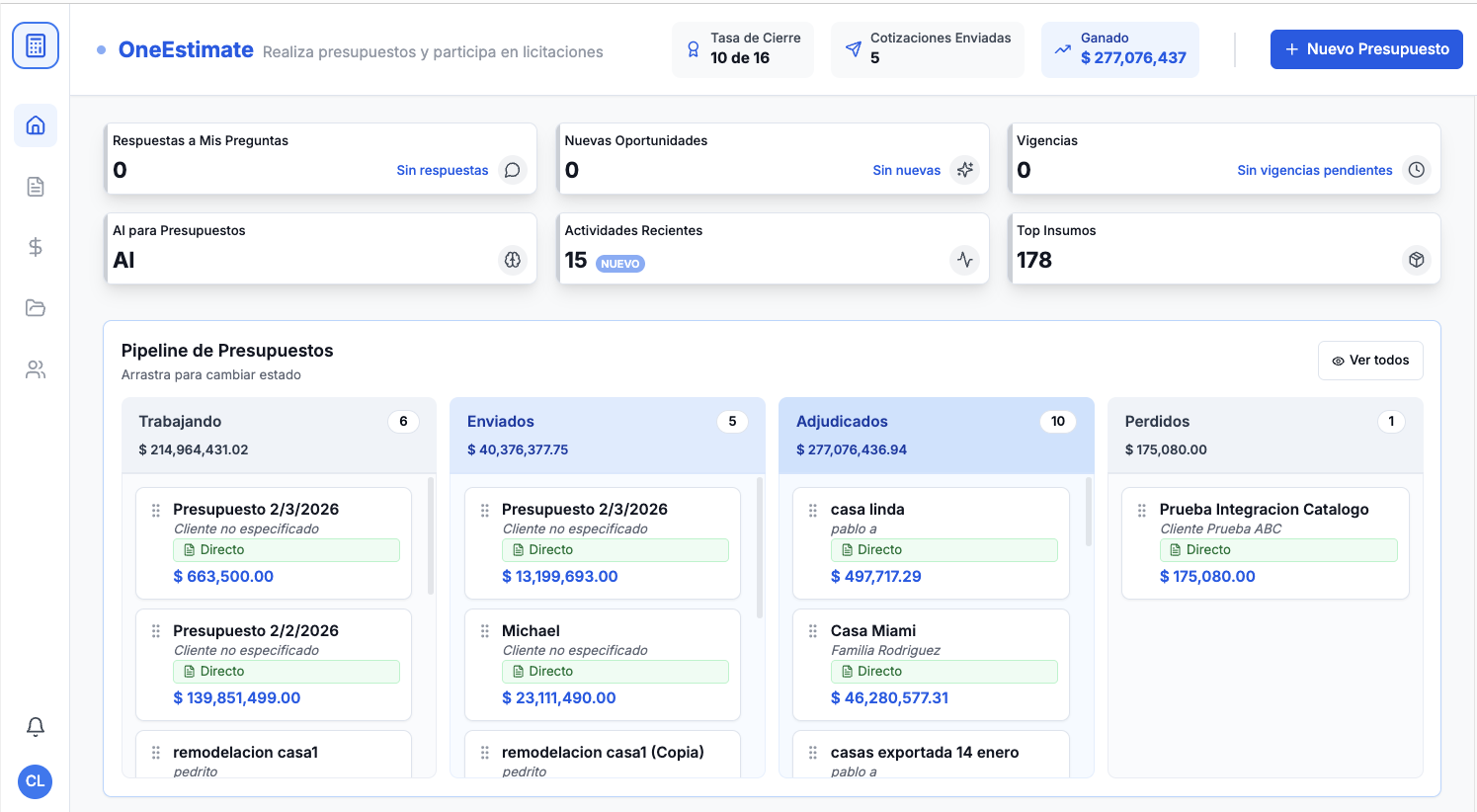
Remodelers juggle many bids at once. A Working → Sent → Won → Lost pipeline inside the estimating tool keeps every open bid visible without a separate CRM.
4. Change order handling
When the homeowner adds a scope or you find hidden damage, you need to re-estimate a portion of the job without rebuilding the entire bid. Look for tools that let you duplicate and modify sections.
5. Cloud + field access
You verify measurements on site, not at a desk. The tool must work on a tablet or phone so you can check dimensions and update the estimate from the job site.
6. Free plan to start
Remodeling businesses range from solo operators to 50-person firms. A free plan lets you test the tool on a real project before committing.
| Capability | Why it matters for remodeling | OneEstimate |
|---|---|---|
| AI multi-scope breakdown | Mixed trades in every bid | Core feature — auto-generates material, labor & equipment |
| Cost incidence per activity | See which scope drives the price | Built in |
| Bid pipeline (Working → Sent → Won → Lost) | Manage 5–15 open bids | Built in |
| Change order support | Hidden conditions = re-estimates | Duplicate & modify sections |
| Cloud + field access | Verify dimensions on site | Yes, any device |
| Free plan | Test on a real remodel before paying | Yes |
How to estimate a remodeling project step by step
Walk the site and document existing conditions — photograph every room, note materials, measure rough dimensions. Flag anything that might hide surprises (old plaster walls, galvanized plumbing, fuse boxes).
Define the scope of work — break the project into trade-level scopes: demo, structural, electrical, plumbing, HVAC, insulation, drywall, flooring, painting, cabinets/millwork, fixtures, final cleanup.
Run the AI breakdown — feed the scope into OneEstimate. The AI generates a material, labor and equipment breakdown for each scope automatically. Review and adjust.
Price materials at local rates — swap national averages for quotes from your suppliers. OneEstimate lets you override any unit cost.
Add subcontractor costs — for scopes you sub out, plug in the sub's bid as a lump sum or a per-unit rate.
Apply overhead and profit — standard markup for remodeling GCs is 10–20% overhead + 10–15% profit, depending on project size and risk.
Review cost incidence — check which activities drive the total. If tile is 30% of a bathroom bid, make sure those quantities are rock-solid.
Submit and track — move the bid to "Sent" in the pipeline. When the client responds, update status to Won or Lost so you know your win rate.
Trade-specific estimating guides
Remodeling touches many trades. We've published detailed guides for each one:
- Estimating Software for Electrical Contractors
- Estimating Software for Plumbing Contractors
- Estimating Software for HVAC Contractors
- Estimating Software for Concrete Contractors
- Estimating Software for Painting Contractors
- Estimating Software for Drywall Contractors
- Estimating Software for Flooring Contractors
- Best Estimating Software for Renovation Projects
- Best Estimating Software for General Contractors
- Kitchen & Bathroom Remodeling Estimating Software
- Residential Renovation Estimating Software
- Best Construction Estimating Software (2026)
Our recommendation
We recommend OneEstimate: one AI-built breakdown across every scope in the remodel, cost incidence per activity, a bid pipeline to keep multiple jobs straight, and a free plan to try it on a real project.
Remodel labor rates swing widely by market, so build each bid on local numbers instead of a national average — you can look up construction labor rates by state for free before you price the job.
Frequently Asked Questions
Can estimating software handle a bid with multiple trades?
Yes — OneEstimate builds a combined material, labor and equipment breakdown with AI across every scope in your bid, which you then review and adjust.
What's the best estimating software for small remodeling businesses?
OneEstimate offers a free plan with AI-powered breakdowns, so even a solo remodeler can produce professional estimates without a big software investment. See our guide for small contractors.
How do I estimate a kitchen remodel?
Define the scopes (demo, electrical, plumbing, cabinets, countertops, tile, appliances, painting), run the AI breakdown, price at local rates, add sub costs, and apply your margin. We cover this in detail in our kitchen & bathroom remodeling guide.
Is OneEstimate cloud-based?
Yes — multiplatform, so your office and field teams share the same estimate in real time.
Can I try it before paying?
Yes, there is a free plan. No credit card required.
How does it compare to spreadsheets?
A spreadsheet can't auto-generate a multi-trade breakdown, track cost incidence, or manage a bid pipeline. OneEstimate does all three with AI.
Stop juggling mixed remodel scopes across tabs and losing track of bids
You already know the pain: a kitchen remodel with seven trades, three subs, and a homeowner who wants the number yesterday. The remedy is a system that builds the entire multi-scope breakdown for you — material, labor and equipment across every trade — and tracks each bid through a Working → Sent → Won → Lost pipeline so nothing falls through the cracks.
At HubService.io we review construction estimating software for U.S. contractors, and our #1 recommendation is OneEstimate: AI-powered estimating that builds your breakdown automatically, shows the cost incidence of every activity, and manages your bid pipeline — all in the cloud, on any device.
Create your free OneEstimate account and get one AI breakdown for your next remodel, plus a bid pipeline to track every open job. Start today at oneestimate.ai — there is a free plan, so you can build your first estimate before you commit to anything.
<!-- en-crosslinks-v1 -->
<hr/>
<h3>Related Estimating Guides</h3>
<ul>
<li><a href="/en/blog/estimating-software-cabinet-millwork-contractors-2026">Estimating Software Cabinet Millwork Contractors</a></li>
<li><a href="/en/blog/estimating-software-waterproofing-contractors">Estimating Software Waterproofing Contractors</a></li>
<li><a href="/en/blog/estimating-software-stucco-eifs-contractors-2026">Estimating Software Stucco EIFS Contractors</a></li>
<li><a href="/en/blog/best-construction-estimating-software-2026">Best Construction Estimating Software</a></li>
<li><a href="/en/blog/ai-construction-estimating-software-usa">AI Construction Estimating Software USA</a></li>
<li><a href="/en/blog/construction-takeoff-software-2026">Construction Takeoff Software</a></li>
</ul>
🚀 Try OneEstimate.ai for FREE
The AI construction estimating software that builds your material, labor and equipment breakdown automatically. Free plan to start — no credit card, no commitment.
Product preview: OneEstimate.ai
Real screenshots of the market-leading AI estimating platform. Click any image to try OneEstimate.ai.